Software /
ChildLock
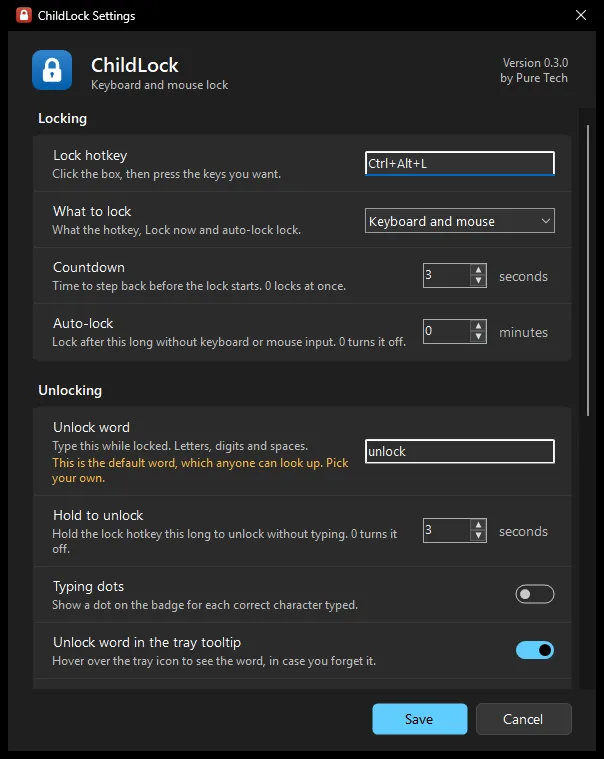
Lock your keyboard and mouse with one shortcut, so a kid (or a cat) can bang on the keys and grab the mouse without anything happening. Whatever is on screen keeps playing. Type a secret word to unlock.
01
What it does
- Locks every key, including Win, Alt+Tab, Alt+F4 and the media keys, plus the whole mouse or touchpad.
- Or locks only the keyboard, or only the mouse.
- Unlocks when you type your secret word, or hold the lock hotkey (Ctrl+Alt+L) for 3 seconds.
- Cleaning mode blacks out every screen and locks input while you wipe the keyboard. A ring around the padlock shows the time left, and it ends by itself after a minute.
- Keeps the PC awake while locked, so a video is not cut off by sleep or the screensaver.
- Locks from a hotkey, from the tray menu, or after a set number of idle minutes.
02
What it needs
- Windows10 or 11, 64-bit.
- .NET 10The Desktop Runtime. Windows offers to install it the first time if it is missing.
- Admin rightsOptional. With them ChildLock can also block input aimed at admin windows such as Task Manager.
03
Measured
Random key presses without unlocking
1,000,000
0 unlocks
How it was measured
A test of 1,000,000 random key presses against the default unlock word, "unlock". It never unlocked.ChildLock README.
Key events let through on unlock
4to0
version 0.2.0version 0.3.0
How it was measured
In the test that holds the hotkey to unlock. Keys still held at the moment ChildLock unlocks used to reach the app in front. They are now swallowed until you let go.ChildLock 0.3.0 release notes.
Slowest input callback when a lock starts
1.6 msto0.38 ms
version 0.2.0version 0.3.0
How it was measured
The slowest callback ranged from 0.6 to 1.6 ms in 0.2.0 and from 0.26 to 0.38 ms in 0.3.0. The average went from about 25 to about 10 microseconds.ChildLock 0.3.0 release notes.
Size of the exe+7%, a change for the worse
392.7 KBto421.4 KB
version 0.2.0version 0.3.0
How it was measured
This one went up: 0.3.0 is 7% larger (392,681 to 421,353 bytes on the same PC, measured back to back). Start time is unchanged, private memory went from 11.3 to 12.1 MB, and there is still no measurable CPU when idle.ChildLock 0.3.0 release notes.
04
What it cannot block
- Ctrl+Alt+Del. Windows reserves it and no app can block it. ChildLock treats it as your way out and unlocks.
- Win+L and Windows locking. If Windows locks, ChildLock unlocks itself.
- The power and sleep buttons. Those belong to Windows power settings.
- Touchpad gestures with 3 and 4 fingers have not been verified yet.
- Touchscreens and pens are not tested yet, and probably not fully blocked.
- Ending ChildLock from Task Manager. Someone at an unlocked PC can always do that.
- The unlock word is stored as plain text. It is a kid-proofing word, not a password.
06
Source and license
ChildLock is MIT.